Add a new absence
The plus sign opens the dialog for adding a new absence type.
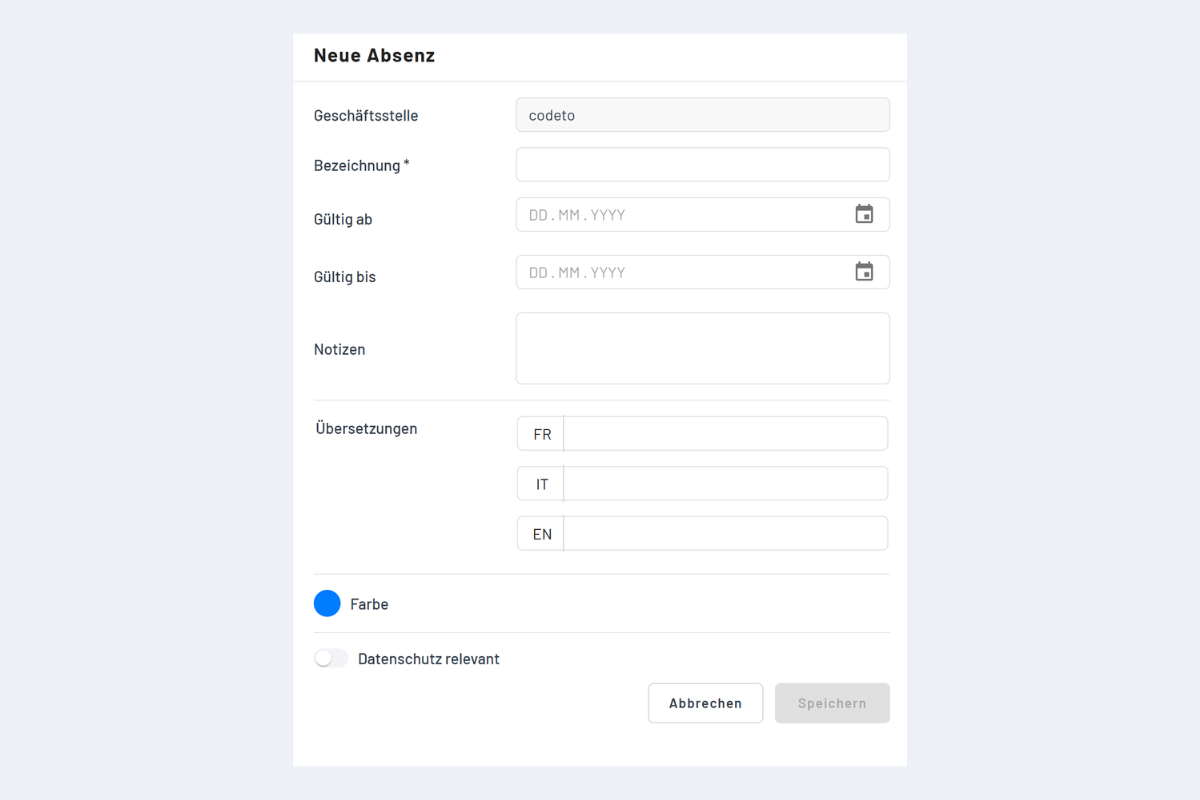
Fields
- Branch office: set automatically.
- Name: mandatory.
- Notes: additional information.
- Translations: optional, if multilingual labels are needed.
- Overrides public holidays: currently has no effect.
- Privacy-relevant: users without the Master or Admin role only see the masked entry "Absence" for absence bookings of this type, without description or details. See section Display in the Disposition.
- Validity range: period in which this absence type can be booked. Outside this range, the absence is not available for selection. Only admins can define or adjust the validity range.
Absences are not entered manually in bookings
When creating new bookings, absences cannot be added directly in the booking dialog; they are entered only via the absence functions. This keeps planning and absence recording cleanly separate, reduces incorrect entries and ensures correct reporting.
Display in the Disposition
As soon as an absence type is marked as privacy-relevant, the display in the Disposition changes depending on the permissions of the signed-in user:
- Master and Admin: still see the absence with its original label (e.g. "Sick", "Doctor's appointment").
- Users with read or standard write access: instead of the label, they only see the masked entry "Absence".
If an absence suddenly appears in the plan as "Absence" instead of e.g. "Sick", the absence type is marked as privacy-relevant and the signed-in user does not have a Master or Admin role. This is not an error but the intended behavior to protect sensitive absence reasons.