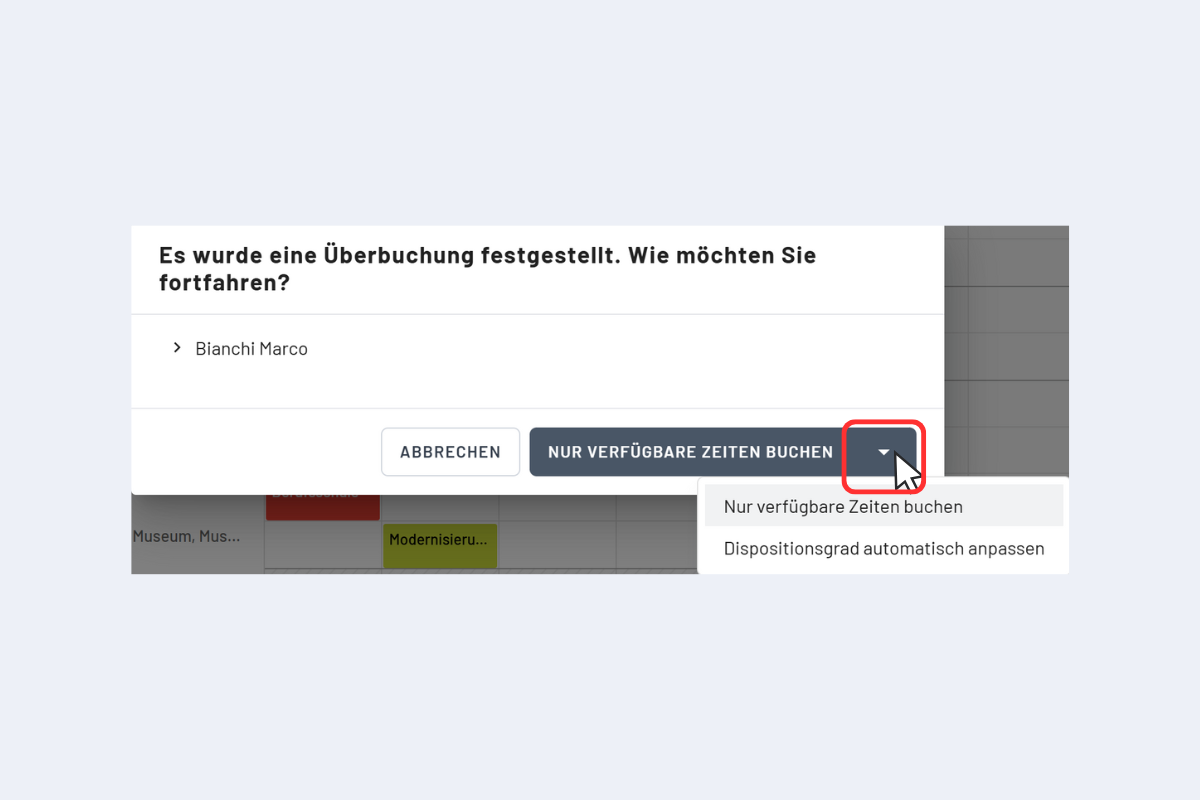
Double bookings detected
codeto plan does not allow over-bookings. When a new booking overlaps an existing one, the system detects the conflict and offers two options (see Fig. Double booking detected):
- Book available times only: the new booking is created only for the free periods. Times already taken remain unchanged.
- Adjust utilization rate automatically: capacity is distributed evenly across the parallel bookings so that 100% per time unit is never exceeded (e.g. two parallel bookings, 50% each). This option is accessible via the arrow next to "Book available times only".
In the project and service views, available employees are also highlighted in green. Employees who are not green can still be booked: the conflict is detected and the same options are offered.
Example
An apprentice has entered a school day on Wednesday. If they are booked for an entire week on a project, codeto plan reports the overlap on Wednesday. With "Book available times only", Monday, Tuesday, Thursday and Friday are scheduled and Wednesday remains free.
Double booking detected