Regular hours, travel time and additional hours
Travel and additional services are recorded directly with the report. The hour type is selected in the entry pop-up per line (see Record project hours for the context within the entry flow).
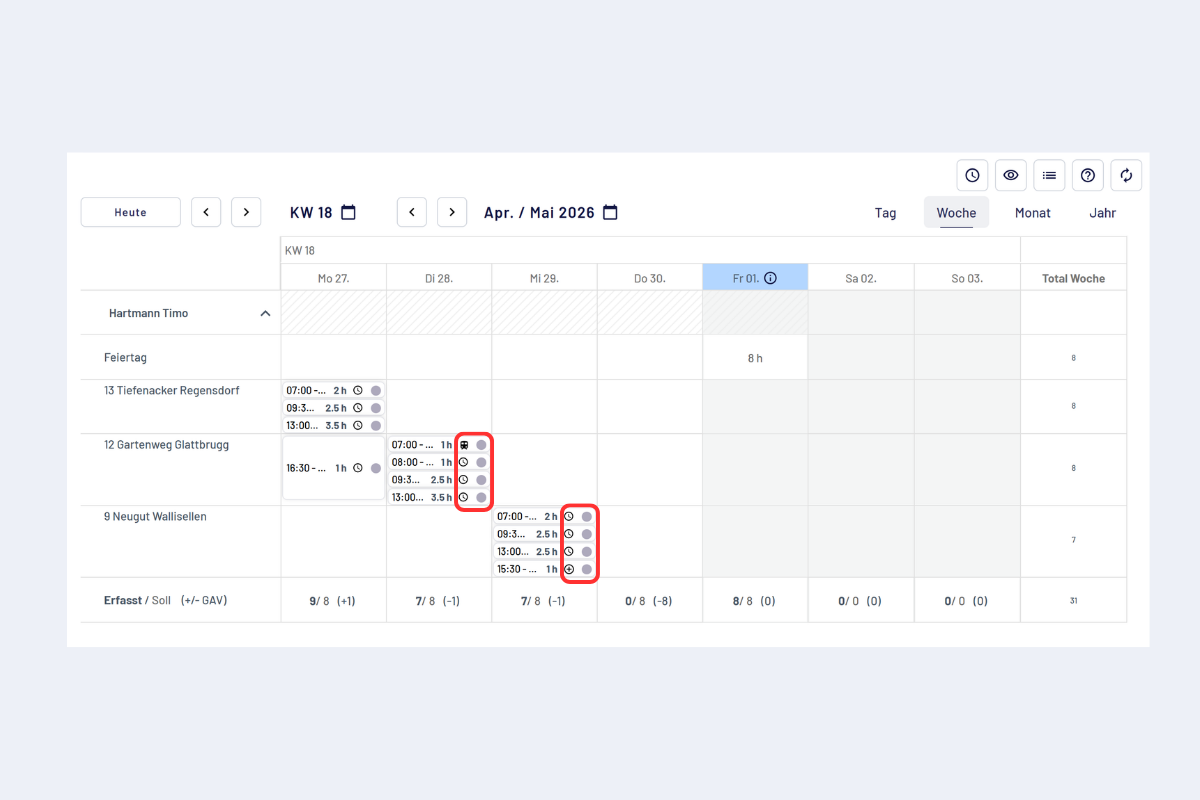
Choose hour type, regular hours, travel time, additional hours
In the image, each hour type is identified by its own icon:
- Regular hours: clock icon.
- Travel time: small train icon.
- Additional hours: small plus icon.
At the bottom edge of the image, the total column is also visible: travel time and additional hours are not included there. Anyone who wants all recorded times to appear in the total can currently only book them as regular hours.
Regular hours
- Regular working time on projects.
- Bookable in all views (day, week, month, year).
- Recorded as usual (from-to or duration), breaks as separate lines.
- Flow into target/actual comparisons and rule checks.
Travel time
- Travel time related to an assignment.
- Bookable like project time (from-to or duration).
- Shown separately in the weekly overview.
Additional hours
- Working times outside regular planning.
- Shown separately depending on the company.
Travel time and additional hours currently do not flow into the hour total of the overview. If the entry should appear there, it must be recorded as regular hours. This behavior is a currently valid configuration and may change in the future.
Additions on the report
Not to be confused with additional hours: additions are separate items recorded in the last step of a report (e.g. business kilometers or petty expenses). Employee overview, including general additions like the lunch allowance: Add additions and expenses.