Status and approval stage
Reports go through clearly defined states, and they also show which stage of the approval structure they currently sit on. Both are visible through colors.
Basic states
These states apply to all reports, regardless of the approval structure:
- Grey, Planned: the entry can be edited or deleted.
- In approval (stage color): after forwarding, the report is locked for employees and takes on the color of the stage it currently sits on (see Stage in the approval structure).
- Green, Approved: finally released.
- Red, Rejected: must be corrected and forwarded again. A rejection always requires a reason.
Stage in the approval structure
While a report is in approval, it carries the color of the stage it currently sits on (e.g. project manager check, project manager, supervisor check, supervisor). This makes it possible to read directly from the report at which position it is in the approval process.
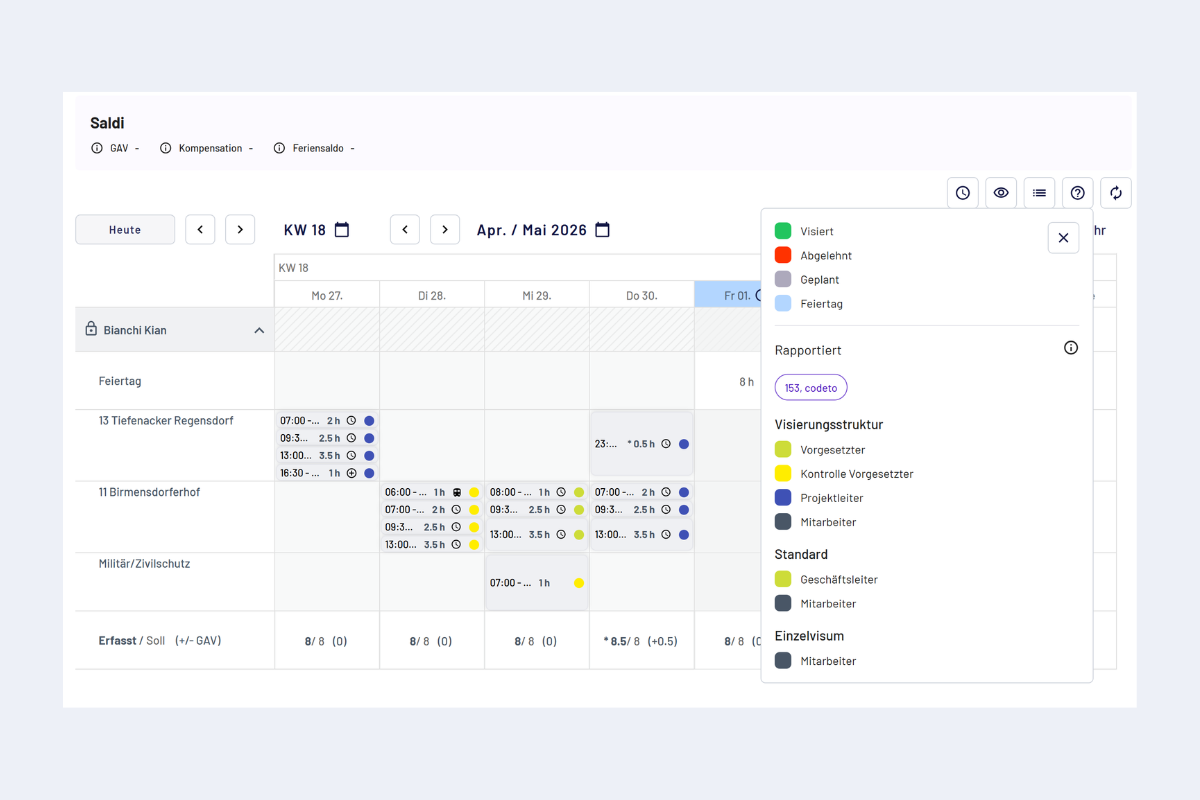
Status and approval stage, colors for state and current stage
The exact mapping of color to stage is shown in the legend (question mark icon in the report overview, see Overview "My report").
A default color is stored for each stage. Master and admins can adjust the colors individually per structure. More about this under Approval structure, Manage structures.