In practice
Short-term planning (1 to 2 weeks)
Goal: keep the planning for the coming days as concrete, gap-free and stable as possible.
- Use the week or month view.
- Use utilization control via the percentage in the top row or the utilization chart.
- Ignore vacancies: generally not relevant in short-term planning.
- Aim for utilization close to 100%, with small reserves for spontaneous assignments or sickness. The further into the future, the lower the utilization may be.
If the disposition rate is below 100% (on one or several bookings of the same person), it directly affects utilization: the person, and therefore the workforce, is not fully utilized. More on the disposition rate.
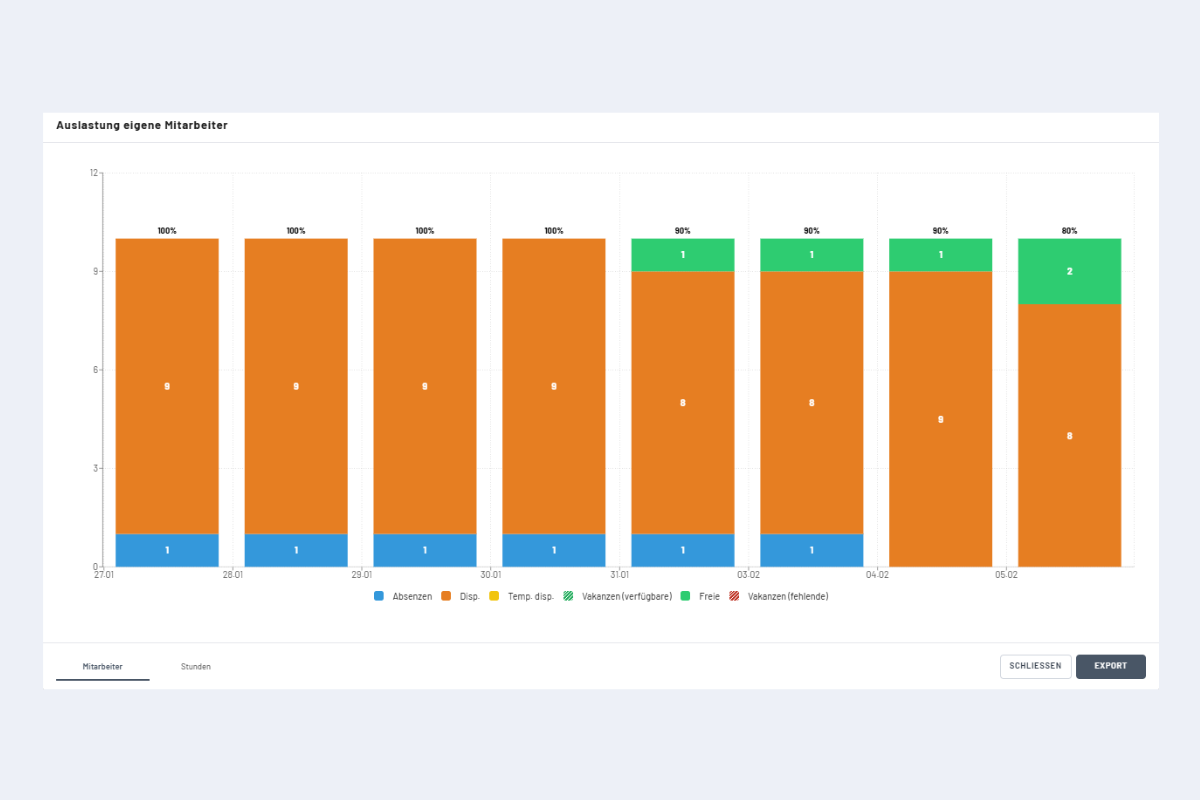
Example reading: in the first four days, all employees are booked except one with an absence. From day 5 one person is available; on the last day, two. They can be booked or kept as a reserve.
Without vacancies, maximum utilization is normally 100%. Exception: if a booking exceeds the standard working time (e.g. 10 hours instead of 8), utilization rises above 100%.
Medium- to long-term resource planning (2 weeks to 1 year)
Goal: check whether a planned project can be covered with the available internal capacity (capacity check).
- Add project and vacancies
- Create the project in the Projects view.
- During the project duration, book the required vacancies (Vacancies).
- Visually check capacity via the utilization chart.
- Make a decision
- Feasible: release the project; the vacancies remain as placeholders.
- Not feasible: postpone, adjust or decline. To decline, first select and delete all bookings, then delete the project.
- Transfer vacancies to employees (example: project manager vacancy):
- Switch to the Employees view and filter by role.
- Switch back to the Projects view.
- Select all bookings of the vacancy (ALT key or CTRL).
- Click "Edit" and pick the matching employee.
- Repeat for further roles.
- Automatic clean-up: as soon as all entries of a vacancy have been assigned, the system deletes the vacancy. The plan is fully captured.